How to Evaluate a Completely Free Website Builder for Small Business Before You Upgrade

Learn how to test a completely free website builder for small business, spot hidden limits, and choose the right paid plan when you're ready to launch.

Quick answer: To evaluate a completely free website builder for small business, test the free tier with a real task like adding a booking page or product, check what features are paywalled, then map your actual upgrade path before you commit. InMinutes lets you build a full draft site on its free plan and test Pro features for three days, so you know exactly what you are buying.
What you need before you start
You need a clear picture of what your business actually requires in the next 12 months, not just today. List your must-haves: online store, appointment booking, invoicing, blog, local SEO, CRM, or email follow-ups. Then note your nice-to-haves. This list becomes your scorecard.
You also need a test scenario. Pick one real task: "a customer books a haircut and pays a deposit" or "someone buys a product and I send an invoice." Run that scenario end-to-end on the free plan. If you cannot complete it without upgrading, that tells you the free tier is a preview, not a working tool.
Finally, check whether the builder locks you into its payment processor or lets you use your own Stripe or PayPal account. Processor lock-in creates a switching cost that outlasts any cheap first month.
How to test a completely free website builder for small business without getting locked in
Step 1: Build a real page, not a demo homepage
Most free plans let you create a homepage and little else. Start with an inner page: services, pricing, or a product. On InMinutes, the free plan gives you one draft site and 200 AI tokens. Describe your business in plain language, let the AI generate the full multi-page structure, then ask it to add that inner page by chatting: "add a services page with three tiers." If the tool forces you to upgrade to add a second page, the free plan is strictly a teaser.
Step 2: Try the editing workflow for five minutes
Drag-and-drop builders look flexible until you spend an hour nudging a button two pixels left. Chat-based editing is the opposite: you say "make the hero darker" or "move testimonials above pricing" and the AI adjusts it. Test which feels faster for your actual patience level. InMinutes uses chat editing exclusively — no drag-and-drop, no code. If you prefer pixel control, that is a real trade-off to note.
Step 3: Export or screenshot your work
Some builders make it painful to leave. Before you invest time, check if you can export content, download images, or at least copy text easily. InMinutes does not have a formal export on the free plan, but your content is yours and you can copy it manually. The bigger lock-in risk is template and layout work that cannot transfer elsewhere. Accept that any builder requires some rebuild if you switch, but minimize unique assets you cannot recreate.
Step 4: Test the upgrade path with a trial, not a guess
InMinutes offers a 3-day free Pro trial for new subscribers. Use it to test the full feature set — store checkout, deposit-taking bookings, SEO controls — then downgrade back to free if you are not ready. This beats guessing what "Pro" means from a feature list.
How to check what's actually included versus held back for paid plans
Step 1: Map each feature to a plan tier
Create a simple checklist. For InMinutes, the facts are clear:
| Feature | Free | Starter | Pro | Business |
|---|---|---|---|---|
| Draft site | 1 | 1 | unlimited | unlimited |
| Publish | no | yes | yes | yes |
| AI tokens | 200 | 1,000 | 3,000 | 6,000 |
| Appointment booking | yes | yes | yes | yes |
| Deposit/card at booking | no | no | yes | yes |
| Online store with checkout | no | no | yes | yes |
| Invoicing | yes | yes | yes | yes |
| SEO meta + LocalBusiness JSON-LD + GEO/llms.txt | yes | yes | yes | yes |
| Audience CRM | yes | yes | yes | yes |
| Google Business import | yes | yes | yes | yes |
| The pattern: core business tools (booking, CRM, invoicing, SEO) are on every plan. Revenue features (store, payment at booking) start at Pro. Publishing itself requires Starter or above. |
Step 2: Watch for "included but useless"
Some builders list SEO or booking as included, but the useful version costs extra. Check whether LocalBusiness schema and local GEO files are automatic or manual. On InMinutes, JSON-LD and llms.txt are built in, not plugins you configure. Booking works on Free, but taking a deposit requires Pro because it rides your Stripe account.
Step 3: Count the add-ons
Many builders advertise a low entry price, then charge separately for email marketing, advanced booking, membership areas, or multi-currency. InMinutes bundles store, booking, invoicing, CRM, and SEO into the Pro plan. The qualitative difference: with competitors, you often assemble a stack of subscriptions; with InMinutes, the stack is one plan.
How to compare real total cost when you add store, booking, and SEO tools
Step 1: Start with your feature list, not the headline price
A base plan looks cheap until you add commerce, booking, CRM, and email as separate subscriptions. The real monthly total is often several times the headline price. Map your complete workflow: a customer finds you via Google, books or buys, you invoice or follow up, and they return. Every tool in that chain needs a line item.
Step 2: Check transaction fees separately from plan cost
InMinutes charges 0% platform fee on Pro and Business when you use your own Stripe or PayPal. Standard card processing still applies — about 2.9% + 30¢ in the US — but there is no additional platform cut. Some competitors also reach 0% under their own conditions, so the honest comparison is under which conditions and with which processor lock-in. InMinutes has no processor lock-in.
Step 3: Factor in the cost of your time
If a builder requires template selection, manual responsive tweaking, or plugin configuration, that is a hidden cost. InMinutes generates the full site in minutes and edits by chat. For a small business owner doing their own site, this difference can mean launching this week versus next quarter.
Step 4: Compare annual versus monthly carefully
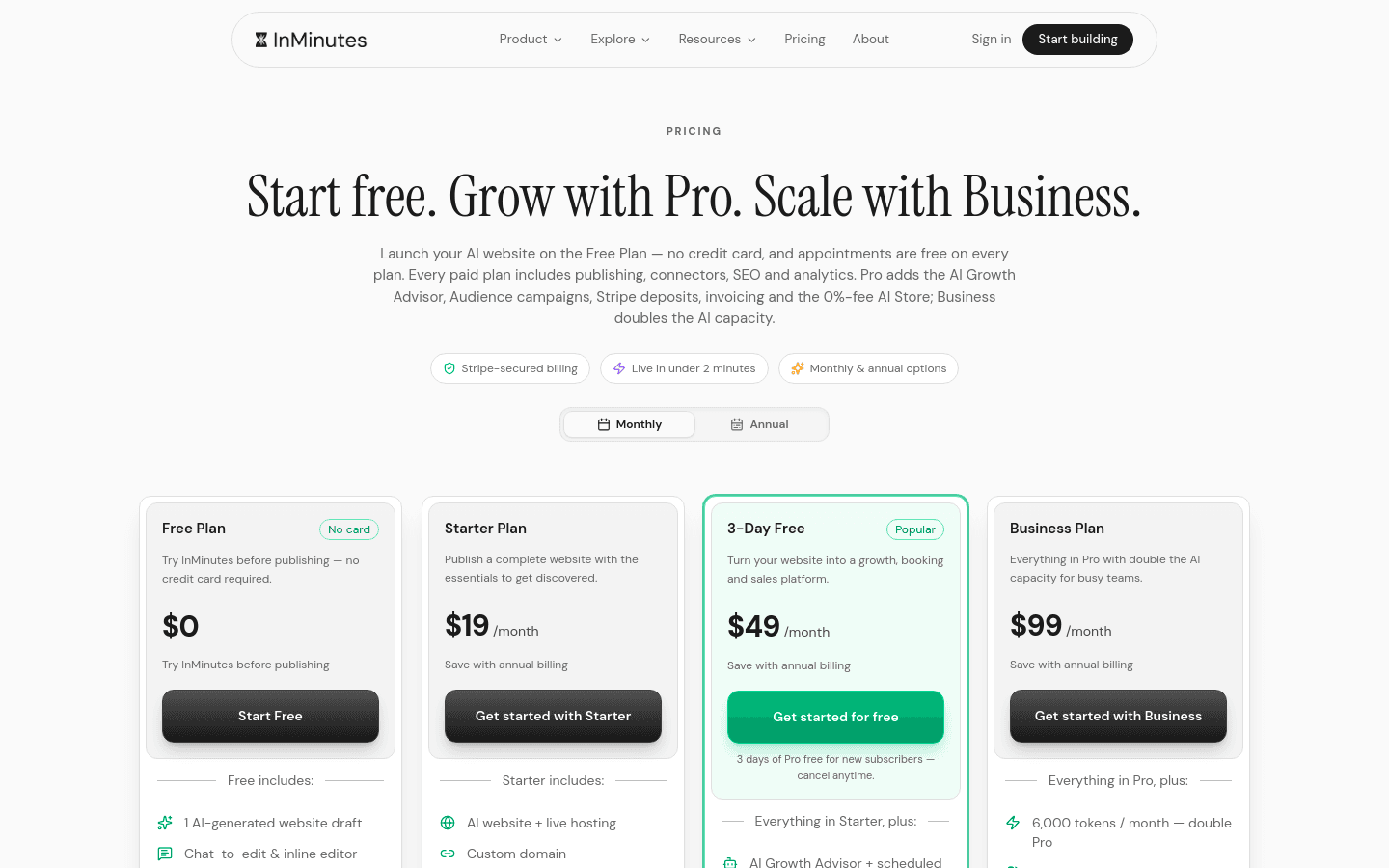
InMinutes annual pricing works out to $0 / $15 / $39 / $79 per month for Free / Starter / Pro / Business. Only pay annual if you are confident in your plan level. The 3-day Pro trial helps you decide before committing.
How to decide when to upgrade and which plan fits your business
Step 1: Upgrade when the free plan blocks revenue
If you cannot take bookings with deposits or sell products, and those are active income streams for your business, the free plan has done its job — it proved the builder works — and it is time to pay. Do not upgrade for vanity features. Upgrade for money-moving features.
Step 2: Match the plan to your transaction type
-
Starter ($19/month, $15 annual): You need a published site with booking and invoicing, but you do not sell products online and you do not need deposits at booking time. Good for service businesses paid in person or invoiced later.
-
Pro ($49/month, $39 annual): You sell products or take deposits at booking. This is the commerce threshold. Also the right plan if you use AI heavily — 3,000 tokens versus 1,000.
-
Business ($99/month, $79 annual): Identical features to Pro, double the AI tokens (6,000). Only choose this if you are hitting the token limit consistently or want the annual discount at a higher tier.
Step 3: Verify your language and market
InMinutes supports six interface languages: English, French, German, Spanish, Turkish, and Chinese. If your team or primary market matches, that is a practical plus. Competitors may offer more languages or different regional payment methods — check what your customers actually use.
The bottom line
A completely free website builder for small business is a research tool, not a permanent home. Use it to test speed, editing style, and feature depth. The best free plan lets you build something real enough to judge, then offers a clear, affordable path to the features that earn money.
InMinutes stands out because the free draft site actually works — you generate a full multi-page site by description, edit it by chat, and test Pro commerce features for three days before paying. At $49 per month, Pro replaces a stack of separate subscriptions: store with 0% platform fee (plus standard card processing), appointment booking with deposits, invoicing, CRM, SEO with LocalBusiness schema and GEO files, and AI-assisted editing. That is one plan instead of assembled add-ons.
If you are evaluating builders this week, start with the InMinutes free draft. Build your actual site, run your booking or store scenario, and use the Pro trial to see if the all-in-one structure fits your workflow. Then upgrade with confidence, knowing exactly what you are paying for.
Ready to stop comparing and start building? Launch your free draft site with InMinutes and test the full Pro feature set for three days.
FAQ
Ready?
Your site, live in 2 minutes with InMinutes.
No agency. No waiting. Flat monthly fee.
Start for free →